AI use case capacity agent

How a technology consultancy cut replanning effort from 80% to 25%

Unplanned hours replanned around every consultant's availability. Less time moving hours, more time finding work.

hero-ai-use-case-capacity

80% → 25%

of the capacity team's time spent on replanning

Earlier

signaling of resourcing issues and at-risk finish dates

More time

to find revenue for consultants with spare capacity

From moving hours to finding revenue

With replanning down to 25% of its time, the capacity team works ahead of problems instead of behind them. Resourcing issues and at-risk finish dates surface earlier. The time it gets back goes to finding work for consultants with spare capacity.

capacity-agent-how-it-works (1)

How the capacity agent replans a deliverable

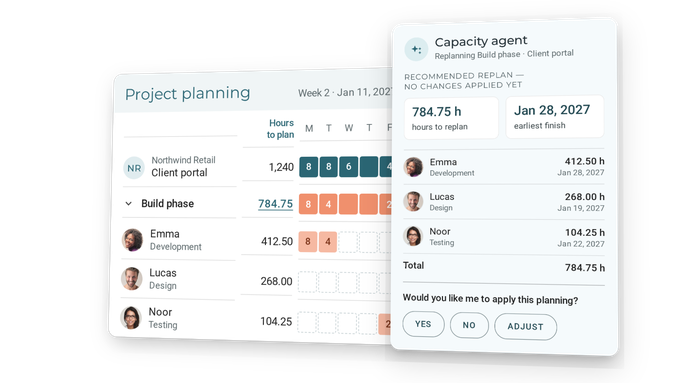
  1. Analyze. The agent looks at the unplanned work on each deliverable and the team allocated to it.

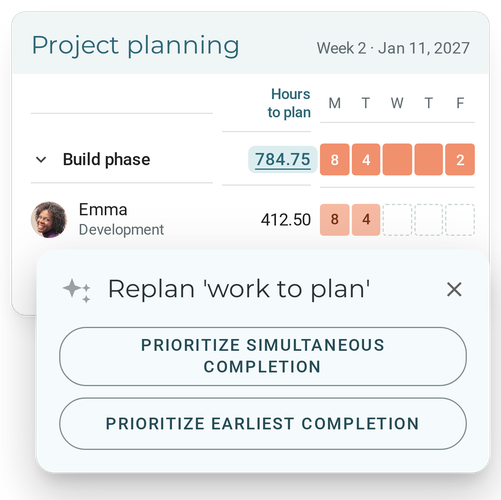
  2. Choose a scenario. Have the whole team finish at the same time, or finish the deliverable as early as possible.

  3. Fill the gaps. Gaps in the current timeline are filled first. Remaining work is spread pro rata by allocation and rate.

  4. Respect the constraints. Each person's day pattern, weekly available hours and blocked weeks are taken into account. Hours already planned stay untouched.

  5. Review and approve. The capacity team sees hours, value and finish date per person, and applies the plan only when it's right.

Every recommendation shows the prompt behind it: the context, goal, rules and logic the agent follows. Firms tune those prompts to their own replanning rules in AI configuration.

The challenge

Replanning took 80% of the team's time

This global technology consultancy designs and builds custom software and hardware, bringing design, engineering, data, AI and IoT together. Its capacity team plans consultants across concurrent client projects and deliverables.

Whenever work was left unplanned on a deliverable, the hours had to be redistributed by hand. That meant checking who was available, which days they worked, their weekly limits and what else they were booked on. It took around 80% of the team's time.

That left little room to spot resourcing issues early, or to find work for consultants with spare capacity. And unplanned hours are revenue left on the table.

At a glance

Before VOGSYThe challengeWith the capacity agent
Manual redistributionUnplanned hours spread by hand across the teamAgent recommends how to redistribute the work per deliverable
Complex constraintsDay patterns, weekly limits and blocked weeks checked person by personEvery member's constraints respected; planned hours untouched
Late signalsLittle time to act early on resourcing issuesIssues and at-risk finish dates surface earlier
Idle capacityNo time to find work for consultants with spare capacityFreed-up time goes to new revenue opportunities

Take your planning a step closer to cash

See how the capacity agent keeps plans current as projects change, and how VOGSY speeds up the flow from lead to cash.

Frequently asked questions

How does the capacity agent replan a project?

It takes the unplanned hours on each deliverable and spreads them across the allocated team: gaps first, then by allocation and rate, around availability and blocked weeks. Existing planned hours stay put. You review hours, value and finish date per person, then approve.

Does the agent change the plan on its own?

No. It presents the replan per person, and the capacity team applies it only after approval.

What does the agent take into account?

Each team member's day pattern, weekly available hours, blocked weeks, and their allocation and rate on the deliverable.

Can we adapt the replanning rules?

Yes. In AI configuration you tune the prompts behind the agents, including your own replanning scenarios.

Is it safe to let AI work on our planning data?

The agents work on your own structured VOGSY data, within each user's permissions. Customer data is never used to train foundation models. VOGSY is ISO 42001 and ISO 27001 certified.