How to set up email templates in VOGSY
First published on September 12, 2025 , updated on September 19, 2025VOGSY emails quotes, invoices, and project evaluations to your contacts. These emails are automatically generated using email templates. VOGSY offers a default set of templated emails. You can use these default templates or configure them if you want to use specific texts for different companies or departments.
VOGSY automatically creates a copy of each document template for each selected language code.
So, first, decide in which languages you want to send emails from VOGSY and set them up in the Email Languages section.
The templates still need to be edited to match the corresponding language code.
Pro-Tip: Do not change the language of the fields between curly brackets if you are setting up other languages than English.
VOGSY only reads and fills these fields if they are in English.
Templates per company/department
If your company is structured into different companies and departments, you can define a different email template for each. This allows you to send out different emails depending on the company or department to which the project or opportunity relates.
Editing the email template
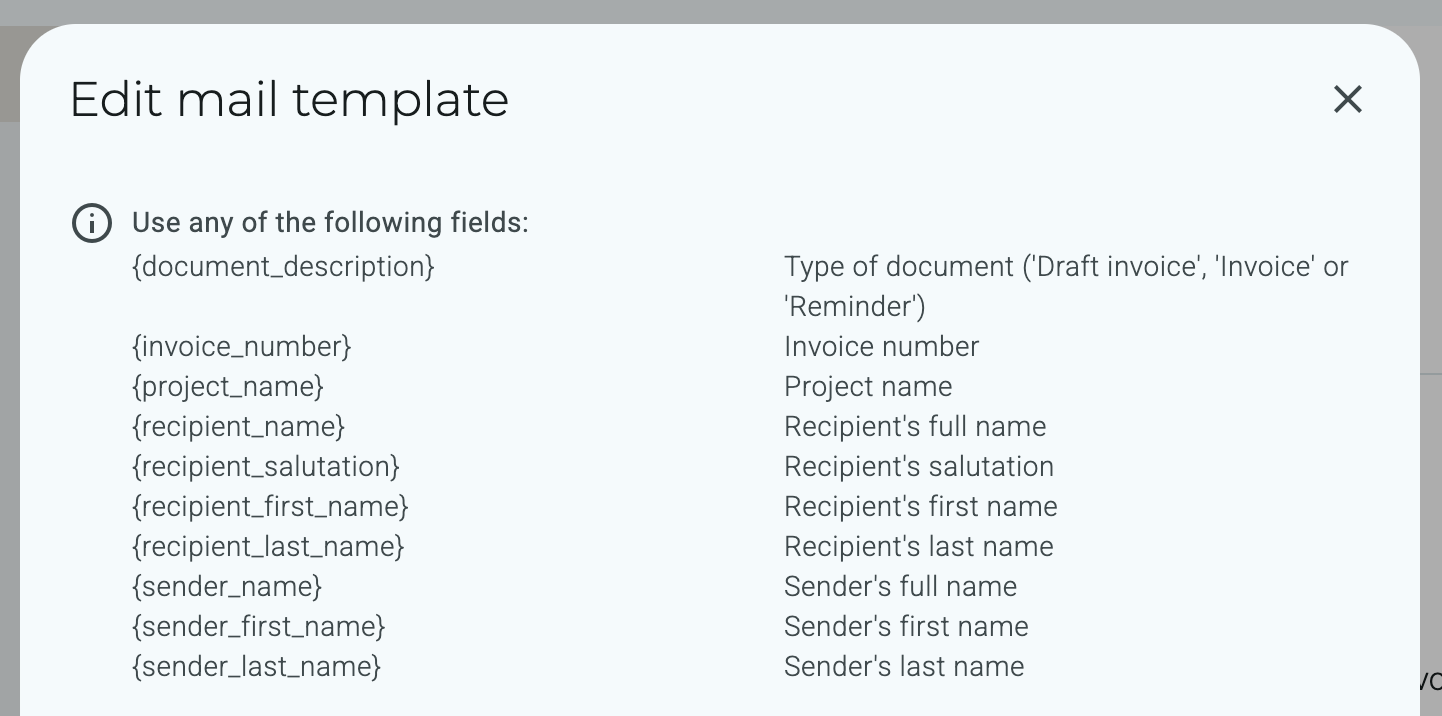
While editing the email template, a full list of all the fields available for the template is shown.
Hereunder the available fields for the project invoice template.