
The VOGSY Google Sheet add-on has moved
First published on January 13, 2026 , updated on July 29, 2026Who is this for?
This update applies only to organizations using VOGSY on a Google Domain (Google Workspace). If your organization is on a Microsoft domain, this change does not affect you.
What do I need to do?
You need to switch to using the new Side Panel Add-on to refresh your data. The old menu item will no longer function after the deadline.
How to find and use the new add-on:
Locate the Side Panel: Look at the far right side of your Google Sheet.
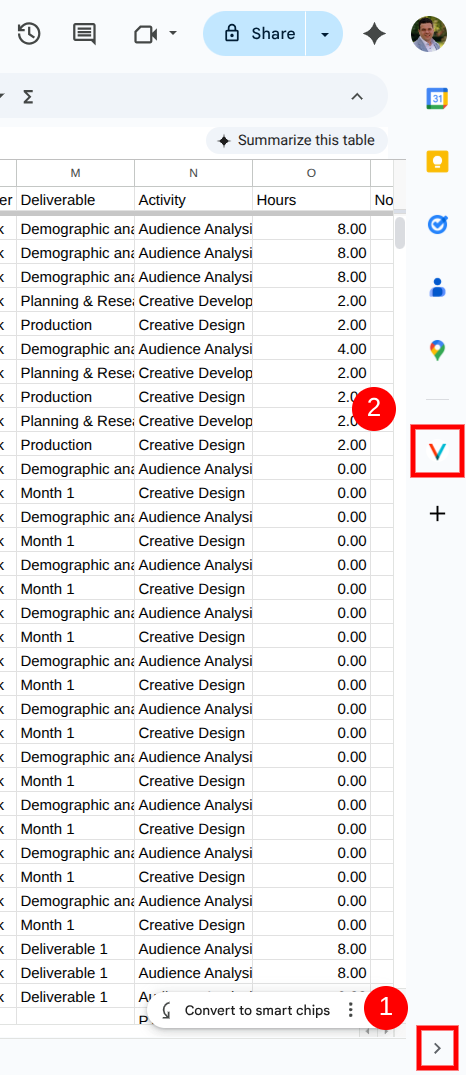
Note: If you don't see a panel, look for a small arrow icon
<(1) at the bottom-right of your screen to expand it.
Open VOGSY: Click the VOGSY icon (the blue V) (2) in the vertical list of icons.
Refresh: The panel will open. Click Refresh Report to load your latest Back Office data.
Here you'll find more information about refreshing reports using the new addon.
Why is this changing?
Google is officially deprecating the older infrastructure that powered our previous Google Sheets add-on. As part of this platform-wide update, the "old" VOGSY menu item ( located in the top menu under Extensions > VOGSY) will stop working at the end of this month.
To ensure your reports remain secure, reliable, and compatible with Google’s latest standards, we have migrated the reporting functionality to a new, modern add-on located in the Google Side Panel.