
Know who's free before you say yes
Agentic resource management
The capacity agent matches skills to work and replans when projects change. Demand shows up from the opportunity stage. You approve every move.
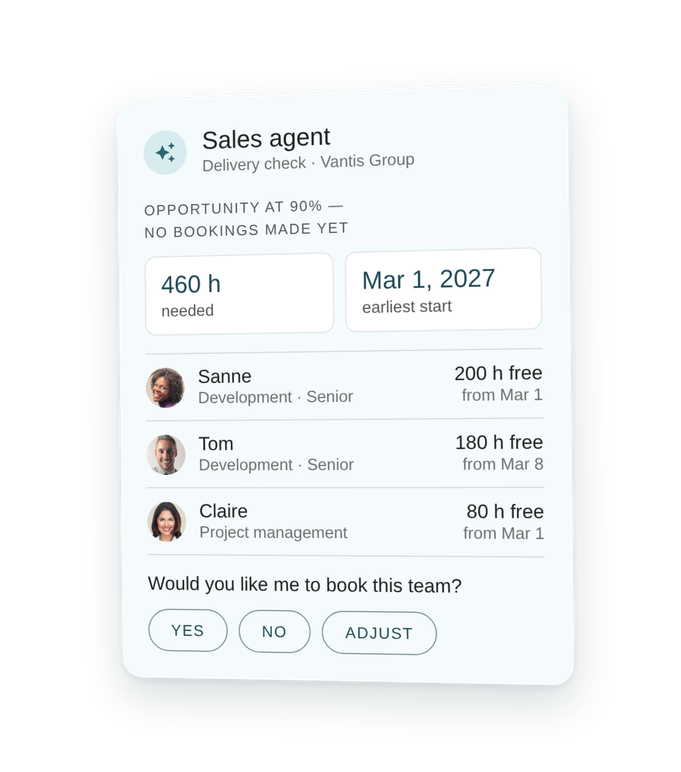
Replan in minutes, not days
Projects slip and people go on leave. The capacity agent proposes a new plan for the whole team, ready to approve.
See demand before the sale
The sales agent books activities and reserves people on the opportunity, so you know what's coming before the contract is signed.
Keep utilization on target
Track billability against targets per person and department, and see where the coming weeks are under- or over-planned.
No plan survives the first client meeting
The capacity agent replans in minutes
A client delays, a consultant takes leave, and the plan is out of date.
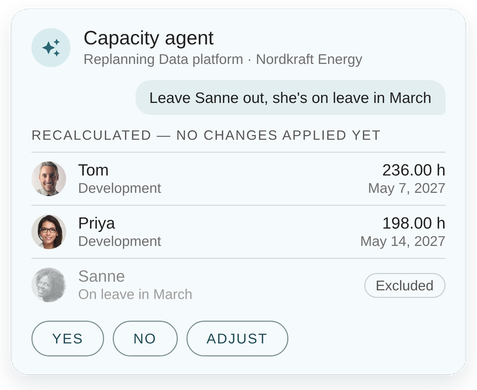
The capacity agent takes the hours still to plan on a deliverable and spreads them across the team. It fills gaps first and works around day patterns, weekly hours, leave and blocked weeks. Hours that are already planned stay as they are.
Not quite right? Tell it to leave someone out and it recalculates. You review hours, value and finish date per person, then approve.
Agentic ERP, proven in practice
70% less time on replanning
Capacity agent at a global technology consultancy
The capacity team cut the time it spends replanning from 80% to 25%. Resourcing issues surface earlier, and the freed-up time goes to finding work for consultants with spare capacity.
Earlier warning on at-risk finish dates
Capacity forecasts from the first RFP
Sales agent and MCP server at Infosight Consultants
Qualified RFPs become opportunities and projects automatically, with the skills and capacity they need. Revenue and capacity forecasts arrive earlier and more accurately.
RFP response from 3–4 days to 3–4 hours
Say yes to the deal. Know you can staff it
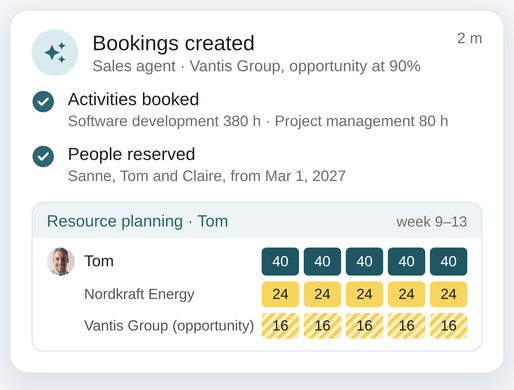
Plan people from the opportunity stage
Staffing usually starts after the contract is signed, and that's often too late.
The sales agent reads the opportunity and books the activities and people it needs. Those bookings sit in the resource planning view next to live projects. You see future demand and spot conflicts before you commit to a start date.
One resource pool, every country
Plan across entities, or just ask your own AI
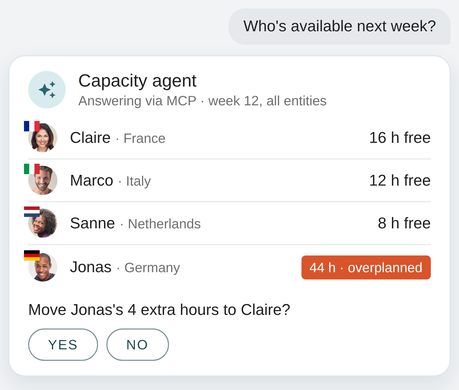
See every consultant across your entities in one planning view, planned on both projects and opportunities. Over-planning shows at a glance, and you can drill in to rebalance.
Prefer to work in Gemini, Claude or Copilot? Ask "who's available next week?" and the VOGSY MCP server answers from live planning, within each user's access rights. It confirms with you before it changes anything.
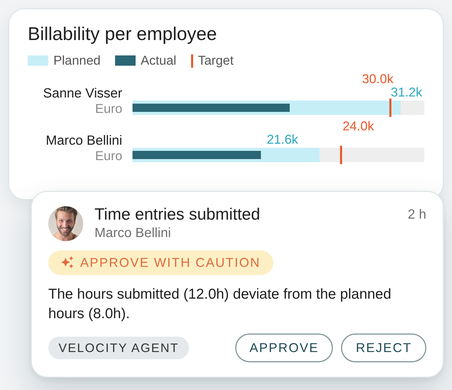
Billable hours, on target
Utilization you can steer, not just report
Set billability targets per employee and track them by person and department, in hours, percentage or value. The utilization forecast shows the coming weeks and months, so you can act on bench time before it happens.
Planned hours then become the benchmark. The velocity agent checks submitted time against them before approval, so clean hours move straight on to invoicing.

Skills and levels
Profile every consultant's skills and proficiency. The capacity agent uses them to match the right people to the work.

Working hours
Set working hours per person, per weekday. The capacity agent plans around them, along with leave and blocked weeks.

Flexible rates
Cost, sales and intercompany rates per employee. Margins stay accurate across entities, and replans take rates into account.

Contractors and placeholders
Bring contractors into projects to plan and track time alongside your team. Use placeholders to flag a need before you've named the person.
Take your team a step closer to cash
Faster staffing, fuller utilization, fewer hours left unplanned. See how VOGSY speeds up the flow from lead to cash.
Frequently asked questions
How does the capacity agent replan a team?
It spreads the hours still to plan on a deliverable across the allocated team. It fills gaps first, then distributes by allocation and rate, around each person's availability and blocked weeks. Hours that are already planned stay put.
Can I change what the agent proposes?
Yes. Adjust it in plain language, for example by leaving someone out, and it recalculates. Nothing changes until you approve.
Can we plan people before a deal is won?
Yes. Opportunity bookings reserve activities and people on an opportunity, and the sales agent can create them from the opportunity description. They show in resource planning next to live projects.
Does it account for leave and part-time schedules?
Yes. Each person's day pattern, weekly available hours, leave and blocked weeks are respected.
Can we use our own AI for resourcing questions?
Yes. Through the VOGSY MCP server, Gemini, Claude, Copilot and other assistants can check availability and planning. They stay within each user's access rights and confirm before changing anything.
Can we adapt the agent to how we staff?
Yes. In AI configuration you tune the prompts behind the agents, including your own replanning scenarios.
Is it safe to let AI work on our resource data?
The agents work on your own VOGSY data, within each user's permissions, and nothing changes without approval. Every recommendation shows the data and the prompt behind it. Customer data is never used to train AI models, and VOGSY is ISO 42001 and ISO 27001 certified.